
Tuesday, 13 October 2015
DAY 22
Today I worked on the cut scene for when the player walks outside to see the "bandit". I realized that I needed an actual bandit sprite to be made first before I can make this cut scene. I also realized that the player starts in the house, and the inside sprites and miscellaneous items in the house have to be made before I make the cut scene, so the player can track around the objects. I put this off until later and worked on the outside room design for the mean time while Jake makes the sprites. I didn't get far into this but I am picturing how the world will look beyond the house. I have some ideas. Next class I will expand upon them. Also, I added couches.


Friday, 9 October 2015
DAY 21
Today Jake and I tweaked the story a bit in the beginning of class a little bit. We wanted to create a cut scene, if not multiple cut scenes. I searched up a tutorial and found one quite helpful, though I didn't get far through due to having an error. I realized I needed a movement variable to implement in to the "timeline". I also got Connor (The guy working on the game but not in this class) to make garbage to scatter around the outside of the house, and got Jake to make furniture for inside of the house, as that's where the beginning of the game starts. I also worked on outdoor design a little bit nearing the end of the class. Below is what the beginning of the masterpiece looks like.


Wednesday, 7 October 2015
DAY 20
Today I continued on room design for the exterior of the game, but most of the class Jake and I came up with the beginning of a story. Were gonna make it so the player and their "other" are in a house, around 1 year after the apocalypse, when cannibals raid your house when you're sleeping. The player is immune to zombies, and has a bite, so the cannibals disregard you, and take your "other". You awaken to hear screeching of tires or something, find that your "other" isn't in their bed sleeping. You run outside and see one of the cannibals, and then that is the tutorial on how to shoot. We will continue on this tomorrow as well as exterior design. Also, we now have an objective board.
Tuesday, 6 October 2015
DAY 19
Today I fixed up the shadow code so it works a little better and looks alright. The only problem is when it goes dark, the shadow is still there, but it actually doesn't look too bad, so I'll leave it for now. I took on the role of Martha Stewart: Outdoor Edition, and starting making the design of the outdoors. I basically made a crap load of trees and made a clearing around where the player spawns. It looks alright and isn't anything at the moment compared to what I'm aiming for. I want it to be a massive room. Also, we want to make an objective board; hopefully on the white board behind Howie, or on my blog or something, I'll do that next class, as well as continuing the room design.


Monday, 5 October 2015
DAY 18
Today I decided to postpone the fixing up of the note at the moment as it isn't as important. I want to continue on aesthetics a little bit more and then work with that later. So Jake showed me a tutorial game which I then used as a reference for creating a shadow for our objects in our game. This was actually quite easy and looks pretty good. I also want to have a light emitting from the bullet but we had a discussion and they want to make the game a top down version and redo everything pretty much. I put in the suggestion of just making 4 basic player sprites, and the players arm rotates still having that top down effect, but not being top down. I think top down shooters take away from the atmosphere.
Friday, 2 October 2015
DAY 17
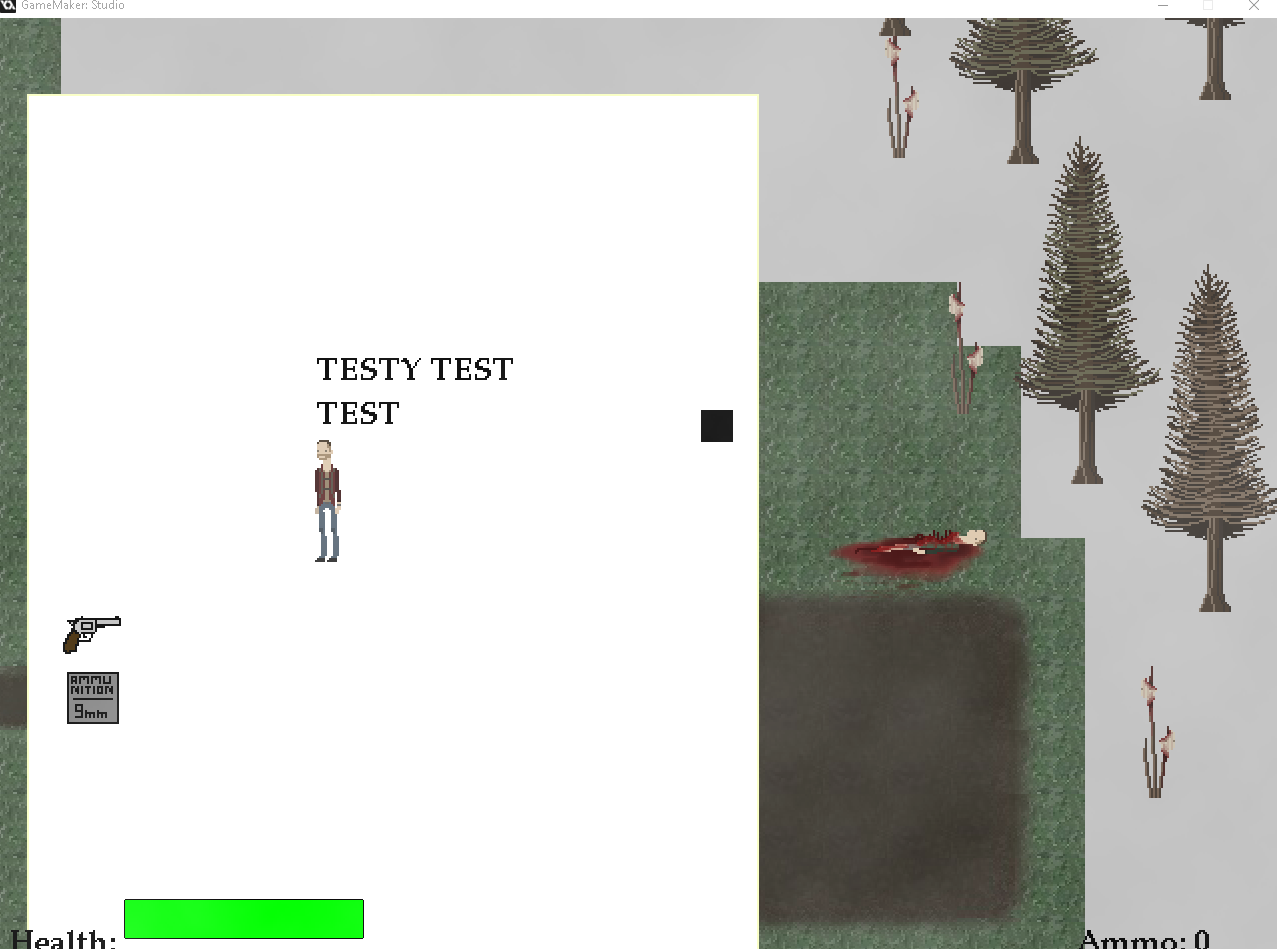
Today we were told to set the "Art crew" up with Game Maker Studio so that they were more involved within the game. We copied Howie's game folder to Simran and Jake's Dropbox folder. I showed Jake how to create sprites and objects and such so he can do it all on his own. I continued working on the text thingy. I made it so the text displays when the player is on it, and disappears when the player moves away. I wanted to make it so the text displays on a "note" that simultaneously pauses the game so that the player can read it. I made a placeholder sprite for the note, and made it so that when the text is drawn, the sprite is also. The only problems now are lining up the text and the note, creating the depth with the text and note, and pausing the game. All of this I will do next class.

Thursday, 1 October 2015
DAY 16
Today I finished up the blending of the path tiles to make it all connect and it looks fairly decent. I continued on working with the text box with the video I watched half of a few days ago. This video ended up not working very well for the style of our game so I found a different one that was better. It is very simple. So far all it does is when the player touches the "note" object (You'll see why it's called note when the story is developed fully), It draws a string with the font of the menu above it a little bit. It's very un-developed at the moment but tomorrow I will continue on working with it to make it look good. I want it to be displayed on a note sprite that I got Jake to start on this class.


Subscribe to:
Posts (Atom)